top of page

EV Charging Information & Signup
Rental Towers
123 avenue st calgary AB
Why is there a Monthly Fee for Shared Charging?
Providing Level 2 charging in a condo building comes at a cost. Unico Power's team provides all billing, monitoring, energy management & support for shared charging.
To cover the cost of providing this service, we charge a small monthly fee. If you are consistently charging at Unico Power shared stations, this fee only adds up to a small percentage of your vehicle costs. You can pause or stop your account payment at any time here.
If you are just charging for a few sessions, no need to worry about recurring fees - After 1 month of inactivity on your account this recurring payment will automatically stop.
Modo Car Share EV Charging
$0.XX
Per unit?
How to Charge with Modo Car Share
1. Ensure vehicle is plugged in.
2. Obtain the RFID charging card from within the vehicle or from your building's management. (pictured, below)
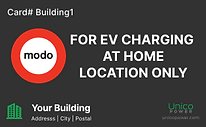
3. Tap RFID card on the front of the EV charger, on the right hand side where the Green RFID symbol is located (pictured, below). Enjoy!


Activating a Personal EV Charger
Attention
Your EV Charger may be installed but not yet ready to activate. Please look for a "under construction" or "ready to activate" label.
The following items are needed to activate:
1. A google, facebook or apple account to set up an account with Unico Power App.
2. The serial number of your Unico Power EV Charger. After you proceed to the app and create an account you will be asked to enter the serial number.
a) If your EV Charger has a QR code, the serial number is the 7 digit code on the bottom right (pictured).

b) If your EV Charger does not have a QR code, please locate the serial number on the label. (SN location on different models pictured).
*Tip - use your phone to take a picture of the label and zoom in to make it easier to read.


3. Have payment information ready, as once you identify and confirm the correct EV charger you will be asked to agree to the terms & conditions and enter payment info.
The Unico Power app is a web-based application, so it's easiest if you sign up directly through the link above. To download the iPhone/Android app, use the links below:
• iPhone App Download
• Android App Download
Requesting a Personal EV Charger in your Stall
Personal charging - plug in when you're home, wake up to a fully charged car. It's that easy with Unico Power.
1. Sign the EV user agreement. Adding an EV Charger to your parking space is considered a change that must be approved by building management. Please feel free to use download and submit the user agreements below based on your province. *Note- some buildings may require you to sign their own user agreement.
Email the completed agreement form to your building's management:
management
2. Contact your building's electrician. Selecting the 'Email Installer' button below will open up an email draft to your building's electrical installer requesting an EV charger installation quote. Please enter your name and parking stall number in the email before sending.
TIP - attaching a front-on shot of your parking stall with the surrounding walls and ceiling will improve the ability to quote your request.
Your building's electrical installer:
installer
3. Approve Quote & Installation. Once you have received and signed an agreement with the electrician, your installation will commence.
4. Activate your personal charger. Once the charger is installed, simply scan the qr code on the front or return to this page a select "personal charging -> activate my charger".
Welcome! This page is currently being updated.
Please check back shortly for information on EV charging installation requests, activation & more.
For any urgent needs, please contact listo_support@unicopower.com. Thank you.
Requesting an EV Charging System in your Townhome Suite
Personal charging - plug in when you're home, wake up to a fully charged car. It's that easy with Unico Power!
1. Contact your building's electrician. Selecting the 'Email Installer' button below will open up an email draft to your building's electrical installer requesting an EV charger installation quote. Please enter your name and parking stall number in the email before sending.
*Tip - attach a picture of your parking area and a front-facing shot of your electrical panel with the door open to improve the accuracy of your quote.
Your building's electrical installer:
2. Approve Quote & Installation. Once you have received and signed an agreement with the electrician, your installation will commence.
3. Activation. Once the electrician has installed your EV charging unit, either the installing electrician or Unico Power's field staff will set up the device, requiring your email address for the final step. You will receive an email asking you to sign up for a Unico Power account.
Once you have signed up with an existing google, apple, or facebook account, you are set up and you will start earning money for each kWh you have charged.
Rental Request a stall
townhome FAQs
How to Activate your Townhome EV Charger
bottom of page